


Statistics
Invoicing bookings from the statistics
Create invoices for unpaid bookings in one go: one invoice per person, one line per booking.
From the statistics dashboard, you can invoice a set of bookings, for example all unpaid bookings for a month or the hours played by guests. Plugin.ch creates one invoice per person, with one line per booking.
The button Invoice these bookings only appears if the cash desk and booking invoicing are enabled for your club.
1Choose the bookings
In Statistics, set the period and filters to keep only the bookings to invoice (for example Last month and the kind Player bookings). Below the list of bookings, click Invoice these bookings.
2Check the lines to invoice
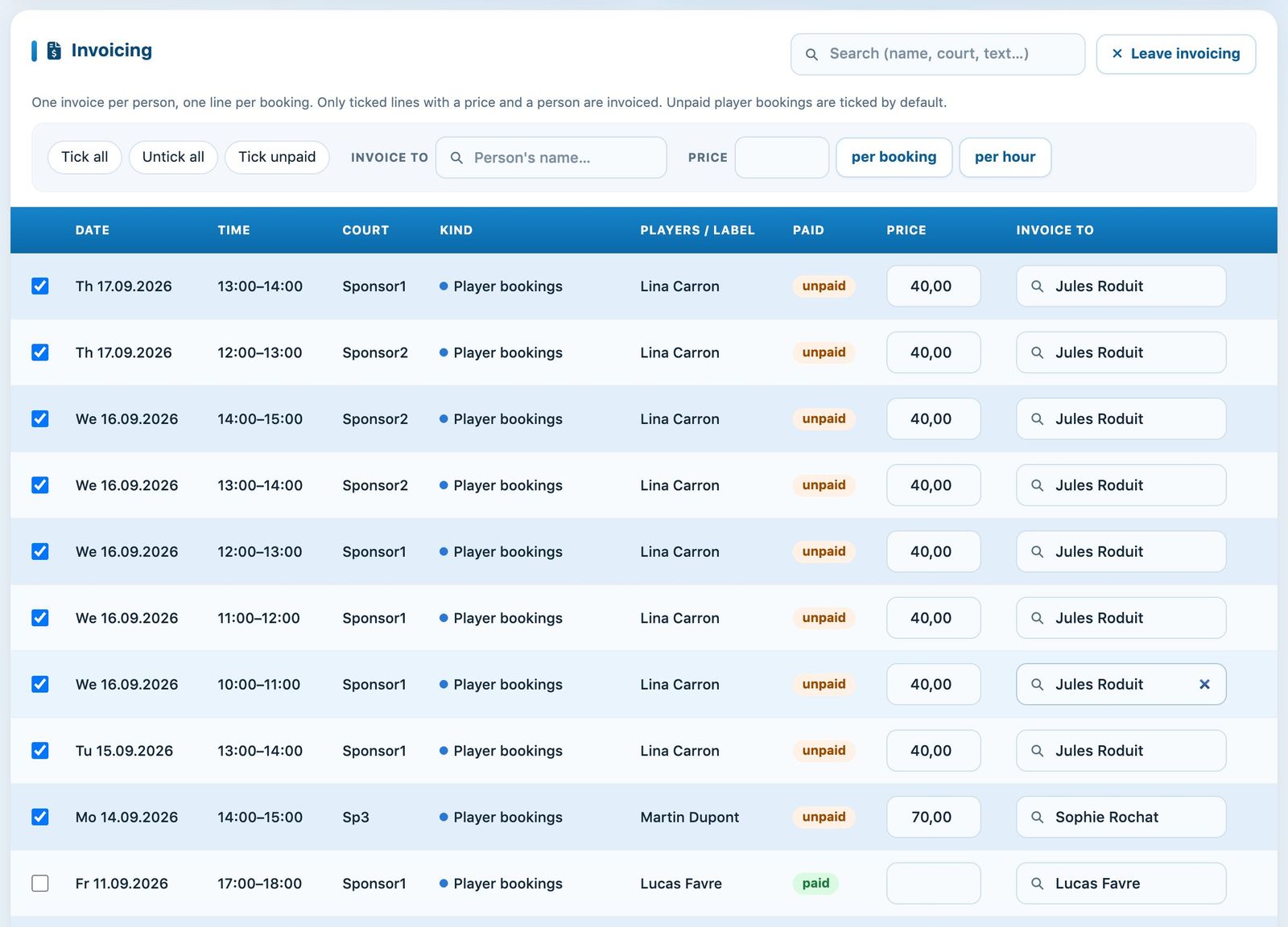
Invoicing mode: each booking with its price and the person to invoice.
Only ticked lines with a price and a person are invoiced. Unpaid player bookings are ticked automatically.
- Select all, Untick all and Tick unpaid change the selection in one click.
- Price: correct the amount on a line, or enter an amount at the top and then click per booking or per hour to apply it to all ticked lines.
- Invoice to: the person who will receive the invoice. Type a name to change it on one line, or use the field at the top to apply it to the ticked lines.
The total at the bottom of the page updates with every change: number of ticked lines, number of people and total amount.
3Create invoices
- Invoice name: the name of the invoice group, suggested by default with today's date.
- Item name on invoice (required): the text printed on each invoice, for example “September bookings”.
- Reply-to e-mail and, if there are several, the payment slip (BVR), invoice, e-mail and reminder templates to use.
- Click Create invoices, review the summary (number of invoices, total and number of bookings), then click Confirm.

The invoice settings and the total of the ticked lines.
The invoices then appear in Invoices, where you print them or send them by e-mail like the others (see Send invoices by email). The button Leave invoicing returns to the list without creating anything.
At most 5,000 bookings are loaded in invoicing mode. If this limit is reached, a warning is shown: shorten the period to make sure everything is invoiced.
Plugin.ch Tutorial — Statistics