


Manage members
Search a member
Find a person by name, e-mail, address, postcode or card, right in the member list
Typing in the search field
In the left-hand menu, open Members › Manage members, then type in the field Name, e-mail, address, postcode, card… at the top of the list. From 2 characters, the list keeps only the matching people.
The search covers the whole club, not just the page displayed: last name, first name, e-mail, address, postcode, town, membership card (RFID), username and additional information.
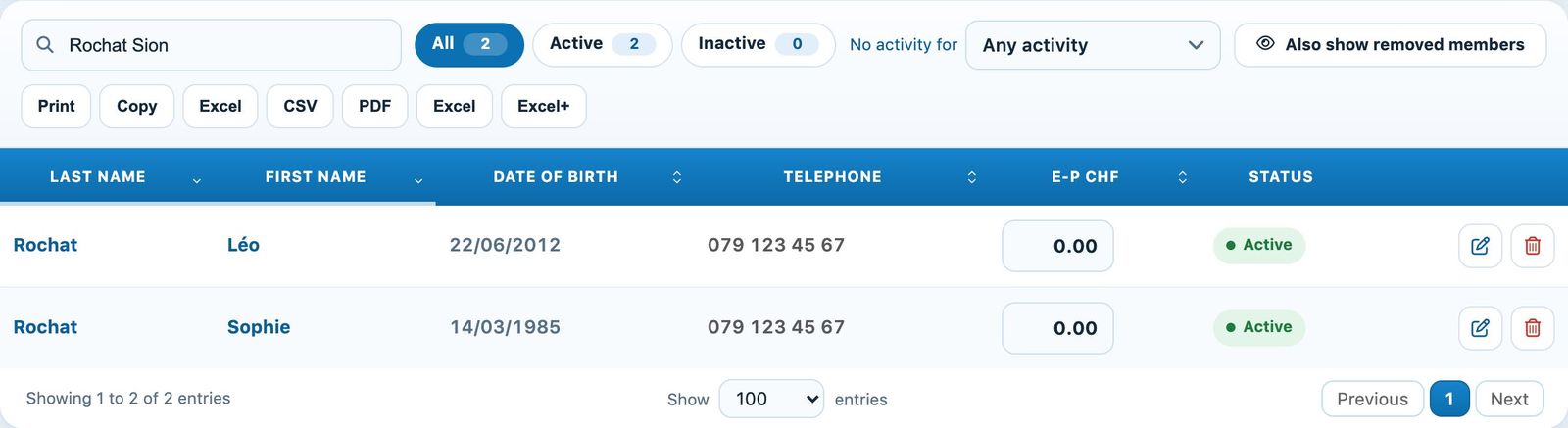
Search "Rochat Sion": only the people matching both words are shown
Combining several words
Separate the criteria with a space: each word must match. For example, "Martigny Val" finds Valentin who lives in Martigny, and "Rochat Sion" finds the Rochats living in Sion.
The chips All, Active and Inactive and the filter No activity for also apply to the results.
Finding a removed member
Removed members are only included if Also show removed members is enabled. When the search finds some while they are hidden, a message says so under the bar, with the link Show them.
Act on the results
From the results, open the profile, edit the person, change their account status or restore a removed member, without the page reloading. Clear the search field to return to the full list.
💡 Helpful tips
By region: type a postcode (for example 1950) to see all the members of a town. From any page: the field Search a member, a page, an invoice… at the top of the screen (shortcut ⌘K or Ctrl+K) also finds a member and opens their profile.
Plugin.ch tutorial — Managing members