


My profile
How do I book for a family member?
If you manage your children's accounts, you can book in their name without logging out: you temporarily switch to their account from your profile.
Note: the switch button only appears for family members under 18. If someone is missing from the list, contact your club's office.
Open the Family tab
Open My profile (click your name at the bottom of the left menu, or tap My profile in the bottom bar on a phone), then the tab Family.

Switch to the child's account
In the My family card, click the switch button (two arrows) to the right of the child's name. The small green icon shows the person who receives the family's invoices.
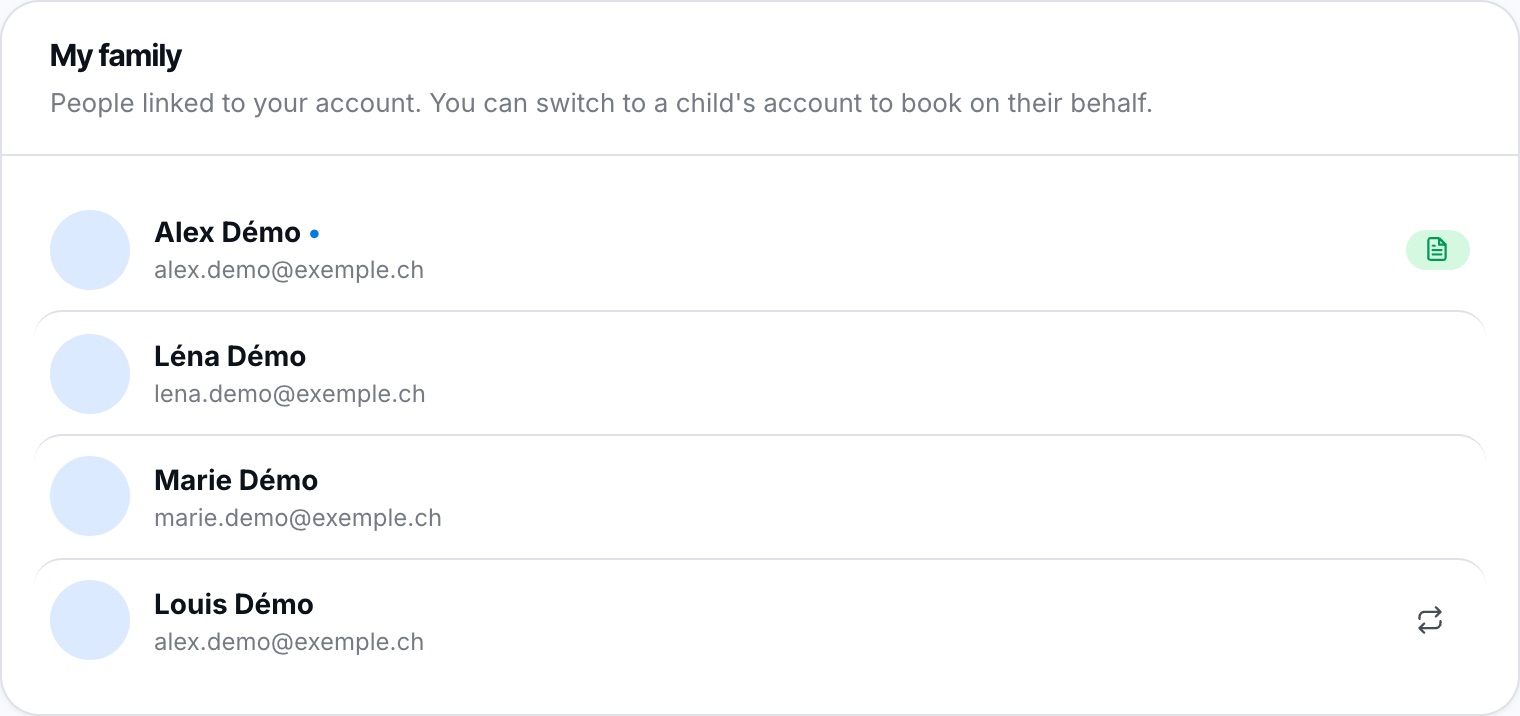
The switch button only appears next to children under 18.
Reserve
You land on the Reserve page: you are now acting on behalf of the child. All bookings you create are recorded in their name. Book as usual. A “You are logged in as …” banner stays at the top of every page to remind you.
Go back to your account
When you have finished, click Back to my account in the “You are logged in as …” banner shown at the top of every page (Reserve, My Profile, My invoices…). The banner disappears as soon as you are back on your own account.

Remember to go back to your account: until you do, your bookings are made in the child's name. While switched, the My data tab is blocked.
Plugin.ch Tutorial — My profile